Threshold Trigger
A threshold trigger is a reading percentage (1 – 100) that, once crossed, fires a predefined action. Use it to pop a newsletter form when readers finish an article, smoothly scroll them back to the top, or hook your own logic through a browser event.
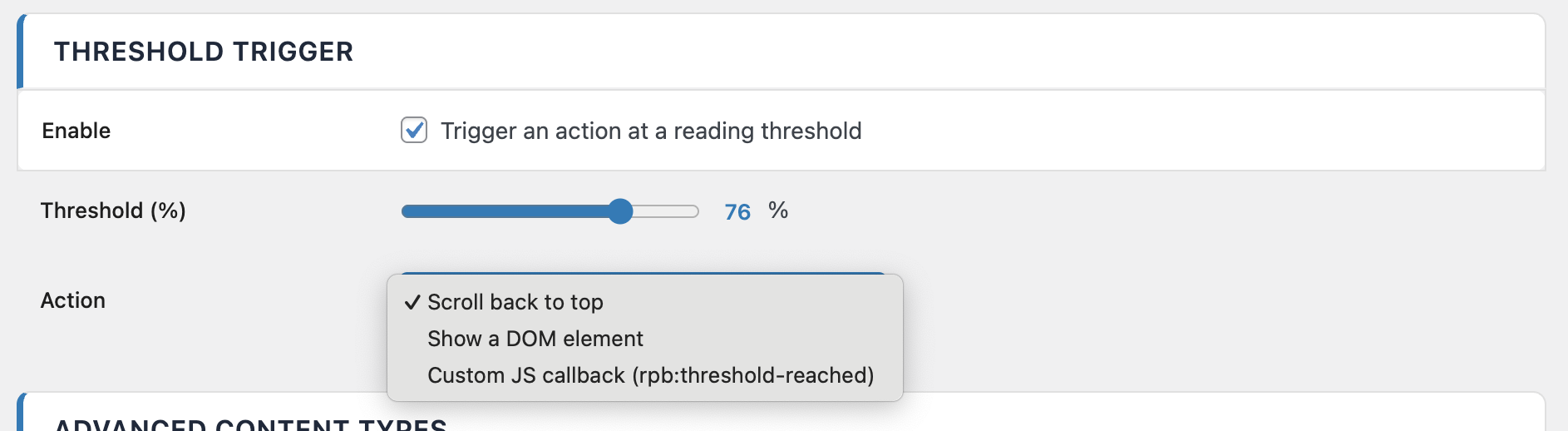
Available actions
1. Scroll to top
Smoothly scrolls the reader back to the top of the page when they cross the threshold. Perfect for very long articles where the reader is unlikely to scroll back up manually — keeps them close to the navigation once they're done.
2. Show element
Reveals a hidden CSS element at the moment the threshold is crossed — ideal for newsletter signups, comment prompts, related-article widgets or call-to-action boxes that should only appear once the reader is invested.
Prepare the target element with a starting display: none and a transition so it fades in cleanly:
.my-newsletter-cta {
  display: none;
  opacity: 0;
  transform: translateY(12px);
  transition: opacity 0.4s ease, transform 0.4s ease;
}
.my-newsletter-cta.is-visible {
  display: block;
  opacity: 1;
  transform: translateY(0);
}
ReadNinja also dispatches a DOM event you can listen for — useful if you want extra logic alongside the CSS reveal:
document.addEventListener('rpb:threshold-reached', (e) => {
  const cta = document.querySelector('.my-newsletter-cta')
  if (cta) cta.classList.add('is-visible')
  console.log('Reader reached', e.detail.percent, '%')
})
3. Custom JavaScript callback
Fires a JavaScript function of your choice when the threshold is reached. In practice, you listen for the same rpb:threshold-reached event dispatched on document and react however you want — fire an analytics event, open a modal, log to the console, call your own API.
document.addEventListener('rpb:threshold-reached', (event) => {
  // event.detail.percent = the configured threshold, e.g. 80
  if (typeof window.gtag === 'function') {
    window.gtag('event', 'reading_threshold_reached', {
      event_category: 'engagement',
      value: event.detail.percent,
    })
  }
})
The event fires once per page load, at the exact moment the reader crosses the configured percentage — it will not fire again if they scroll back and forth.
Per-post override
If you need to disable the threshold trigger on a specific article (for example a very short post where 80 % is reached instantly), set the post meta key _rpb_disable_threshold to 1:
update_post_meta( $post_id, '_rpb_disable_threshold', 1 );
This override is intended for developer use — there is no UI toggle for it in the editor sidebar.