Read Analytics
Read analytics answers the one question traditional page-view analytics can't: who actually finishes my articles. It lives inside your WordPress admin — no external service, no extra SaaS, no JavaScript snippets to paste.
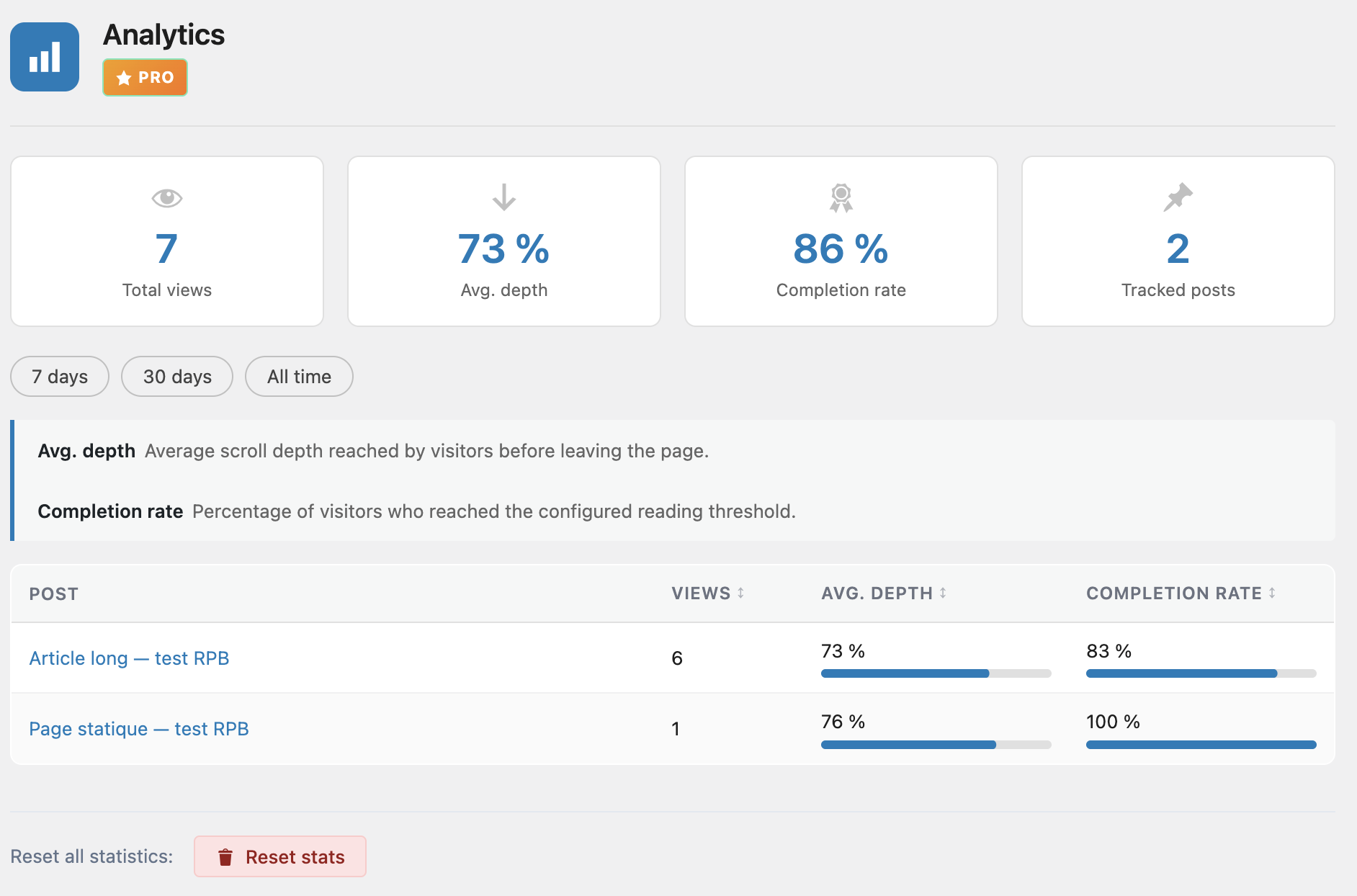
4 KPIs
The top of the dashboard shows four headline metrics, all scoped to the currently selected period.
- Total views — the total number of tracked reading sessions. Each time a reader lands on a post with tracking enabled, one session is recorded.
- Average depth — the average scroll percentage reached across all sessions. A value of 67 % means readers, on average, make it two-thirds of the way through your posts.
- Completion rate — the percentage of sessions that reached the completion threshold (by default 90 %). This is the single most useful number in the dashboard: it tells you how often readers actually finish what they start.
- Tracked posts — the number of distinct posts that have at least one recorded session in the period. Useful to spot posts with zero engagement.
Top 50 posts table
Below the KPIs, a sortable table lists your top 50 posts for the current period.
| Column | Meaning |
|---|---|
| Post title | The post title, linked to the edit screen |
| Views | Number of reading sessions recorded for this post |
| Avg depth | Average scroll percentage, shown as a small progress bar |
| Completion rate | Percentage of sessions that reached the completion threshold |
Use the table to spot long posts that people start but never finish (high views, low completion rate), and the opposite — short posts that are consistently read to the end and could probably be expanded.
Period filter
A period selector at the top of the dashboard lets you scope every KPI and the top 50 table to:
- 7 days — the last 7 days rolling
- 30 days — the last 30 days rolling
- All time — every recorded session, from the moment Pro was activated
Privacy & GDPR
ReadNinja analytics was built to be safe by default. It collects no personal data, uses no cookies and does not call out to any external server.
- No cookies are created or read.
- No personal data is stored — no IP addresses, no user identifiers, no names, no emails.
- Anonymous fingerprint only — sessions are identified by a hashed combination of IP and user agent, used purely to deduplicate sessions within a short window. The raw values are never stored.
- Data is retained for 90 days, then auto-deleted by a scheduled cleanup task.
- A Reset button in the dashboard footer wipes all recorded data immediately. Useful for testing or if you want a fresh start.
Under the hood, tracking is sent from the reader's browser via the navigator.sendBeacon() API so it never blocks page unloads or affects performance.